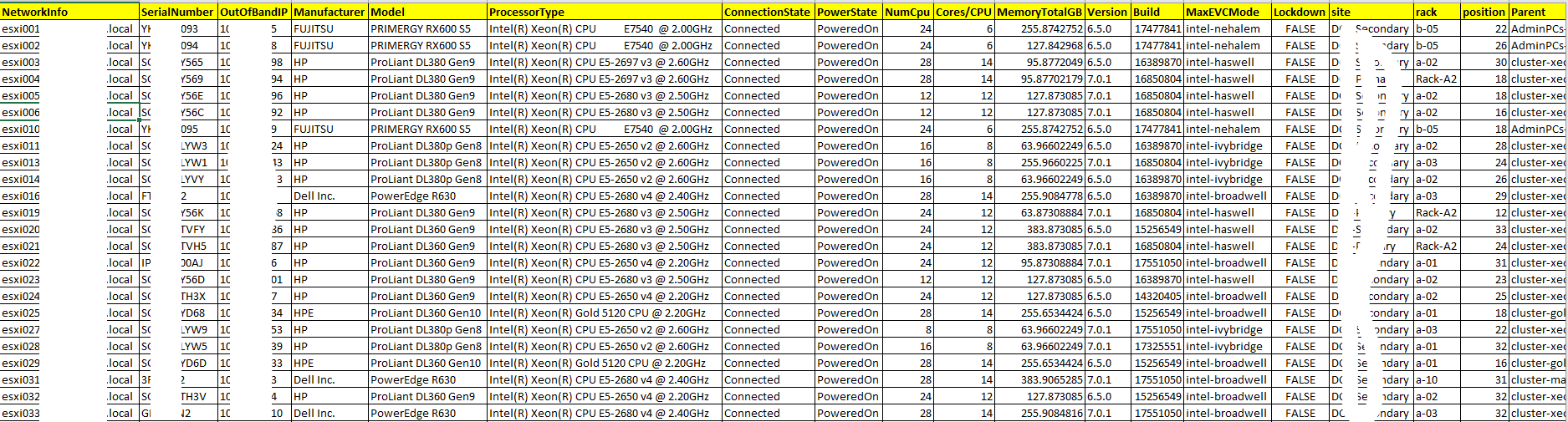
The advantage of below powerCLI is that oneliner shows as well SerialNumber (for example Dell/HP tags – very useful to find your esxi server in Datacenter physically )
Get-VMHost |Select-Object Name,NetworkInfo,Manufacturer,Model,ProcessorType, ConnectionState, PowerState, NumCpu, MemoryTotalGB, Version, Build, MaxEVCMode, @{N="SerialNumber";E={(Get-VMHostHardware -vmhost $_).SerialNumber}} | Export-Csv -notypeinformation -Path c:\temp\all-vmhosts.csv
or more detailed report:
.'C:\Program Files (x86)\VMware\Infrastructure\PowerCLI\Scripts\Initialize-PowerCLIEnvironment.ps1'
connect-viserver vcsa.itforce.local

function Get-VMHostWSManInstance {
        param (
        [Parameter(Mandatory=$TRUE,HelpMessage="VMHosts to probe")]
        [VMware.VimAutomation.Client20.VMHostImpl[]]
        $VMHosts,

        [Parameter(Mandatory=$TRUE,HelpMessage="Class Name")]
        [string]
        $class,

        [switch]
        $ignoreCertFailures,

        [System.Management.Automation.PSCredential]
        $credential=$null
        )

        $omcBase = "http://schema.omc-project.org/wbem/wscim/1/cim-schema/2/"
        $dmtfBase = "http://schemas.dmtf.org/wbem/wscim/1/cim-schema/2/"
        $vmwareBase = "http://schemas.vmware.com/wbem/wscim/1/cim-schema/2/"

        if ($ignoreCertFailures) {
                $option = New-WSManSessionOption -SkipCACheck -SkipCNCheck -SkipRevocationCheck
        } else {
                $option = New-WSManSessionOption
        }
        foreach ($H in $VMHosts) {
                if ($credential -eq $null) {
                        $hView = $H | Get-View -property Value
                        $ticket = $hView.AcquireCimServicesTicket()
                        $password = convertto-securestring $ticket.SessionId -asplaintext -force
                        $credential = new-object -typename System.Management.Automation.PSCredential -argumentlist $ticket.SessionId, $password
                }
                $uri = "https`://" + $h.Name + "/wsman"
                if ($class -cmatch "^CIM") {
                        $baseUrl = $dmtfBase
                } elseif ($class -cmatch "^OMC") {
                        $baseUrl = $omcBase
                } elseif ($class -cmatch "^VMware") {
                        $baseUrl = $vmwareBase
                } else {
                        throw "Unrecognized class"
                }
                Get-WSManInstance -Authentication basic -ConnectionURI $uri -Credential $credential -Enumerate -Port 443 -UseSSL -SessionOption $option -ResourceURI "$baseUrl/$class"
        }
}

# Examples (make sure you are connected to an ESX server.)
# Get-VMHostWSManInstance -VMHost (Get-VMHost) -class CIM_Fan -ignoreCertFailures
# Get-VMHostWSManInstance -VMHost (Get-VMHost) -class VMware_Role -ignoreCertFailures
# Get-VMHostWSManInstance -VMHost (Get-VMHost) -class OMC_Card -ignoreCertFailures
# See http`://www.vmware.com/support/developer/cim-sdk/smash/u2/ga/apirefdoc/ for a list of classes.

function moguy-esxi

{

$filename = "vmware-esxi-" + (get-date).ToString('yyyy-MMMM-dd')

Get-VMHost |Select-Object Name,NetworkInfo,@{N="SerialNumber";E={(Get-VMHostHardware -vmhost $_).SerialNumber}}, `
@{ N="OutOfBandIP";E={(Get-VMHostWSManInstance -VMHost $_ -ignoreCertFailures -class OMC_IPMIIPProtocolEndpoint).IPv4Address}},`
Manufacturer,Model,`
@{N="vmotionIP";E={(get-view $_.id).config.vmotion.ipconfig.ipaddress}},`
ProcessorType, ConnectionState, PowerState, NumCpu,`
@{N="Cores/CPU";E={$_.Extensiondata.Summary.Hardware.NumCpuCores/$_.Extensiondata.Summary.Hardware.NumCpuPkgs}}, `
MemoryTotalGB, Version, Build, MaxEVCMode,`
@{N="Lockdown";E={$_.Extensiondata.Config.adminDisabled}},@{N="site";E={$_.customfields.item("00-site")}}, @{N="rack";E={$_.customfields.item("01-rack")}}, @{N="position";E={$_.customfields.item("02-rack-position")}},`
Parent, @{N="iso-image";E={((get-view ($_.ExtensionData.ConfigManager.ImageConfigManager)).HostImageConfigGetProfile()).name}},`
@{N="wwns";E={[string]::join(",",(Get-VMHostHBA -vmhost $_ -Type FibreChannel | select-object @{N="WWN";E={"{0:X}"-f$_.PortWorldWideName}} | Select-Object -ExpandProperty wwn))}}, `
@{N="10G";E={[string]::join(",", ((Get-EsxCli -VMHost $_ ).network.nic.list()|where {($_.Description -like "*10G*") -or ($_.Description -like "*10 G*")} | Select-Object -ExpandProperty Description))}}`
| Export-Csv -notypeinformation -Path c:\temp\$filename.csv

}

moguy-esxi
ps
The above script implys that you’ve create custom fields for all your esxi named: “00-site”,”01-rack”, “02-rack-position”